Ford Pro™ Release Notes
What’s New with Ford Pro™ Software? December 2025 Edition
Your fleet doesn’t slow down at the end of the year, and neither do we. We know this is one of the busiest seasons for some of our customers, so we’re rolling out new enhancements and a brand-new product to help you stay ahead. This month’s updates are designed to simplify your workload, improve visibility and give you more control – from faster data syncing and smarter driver management to the launch of Ford Pro™ Telematics with Asset Tracking.1420
Whether you’re tracking equipment across job sites or keeping vehicles moving through the holiday rush, we’re here to help make your fleet operations easier, more efficient and ready for whatever the season brings.
What’s New
Ford Pro™ Telematics309 Software
NEW Ford Pro™ Telematics with Asset Tracking1420: Helping You Keep Tabs on Your Equipment
The Asset Tracking solution is a GPS-enabled device, available in wired, battery-powered, or solar-powered options, that helps you keep tabs on the equipment your business depends on.
Once attached to equipment, the asset tracker helps with equipment utilization and location information.
From skid steers and lawn mowers, to forklifts and food carts, Ford Pro Telematics with Asset Tracking can help your business stay productive and protected, no matter the industry.
Key Features:
- Live GPS maps (see below)
- Battery status (see below)
- Trip history
- Geotracking notification when equipment moves
- Accessible via Ford Pro Telematics Drive992 app
- Battery level monitoring and alerts
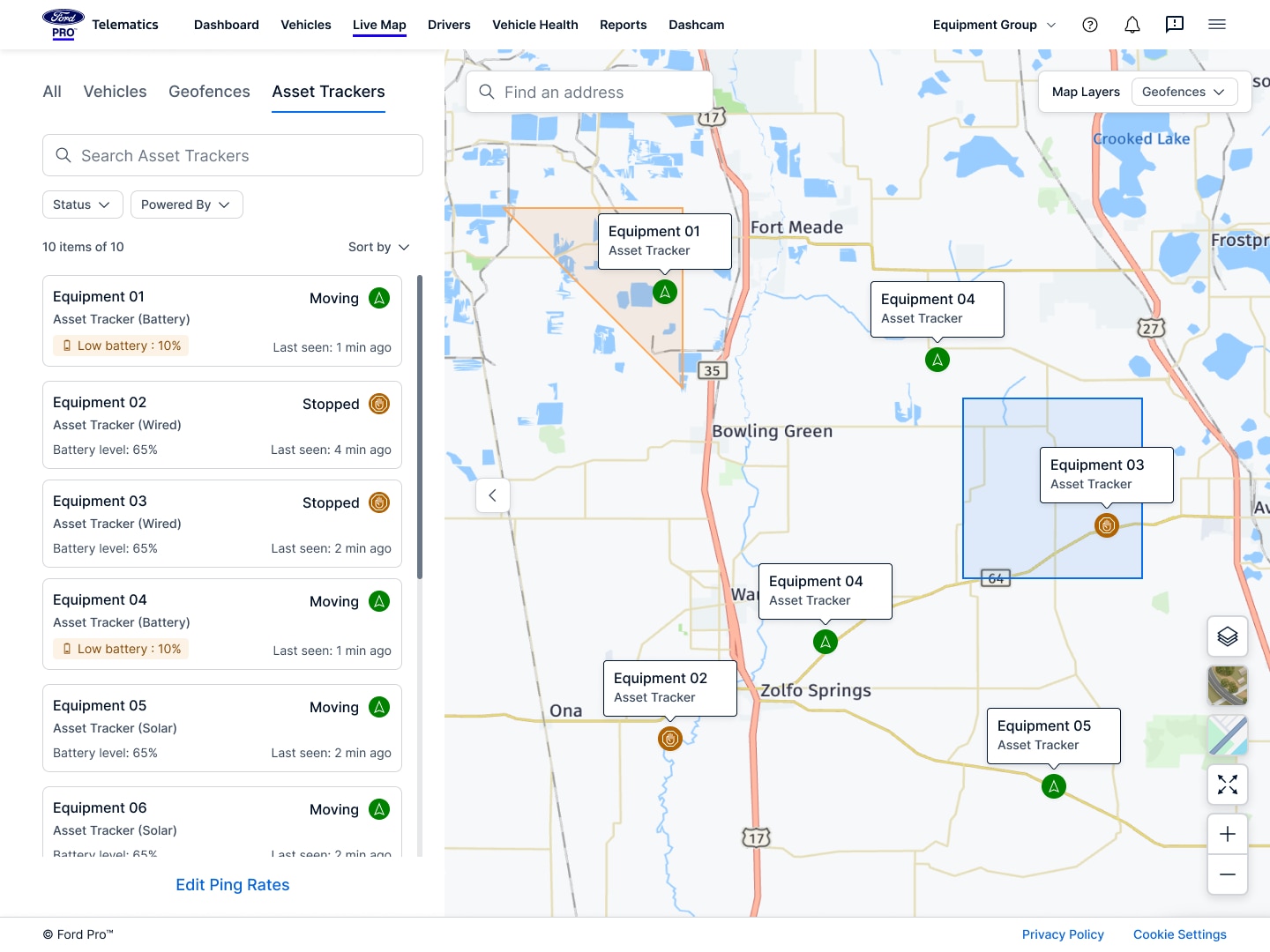
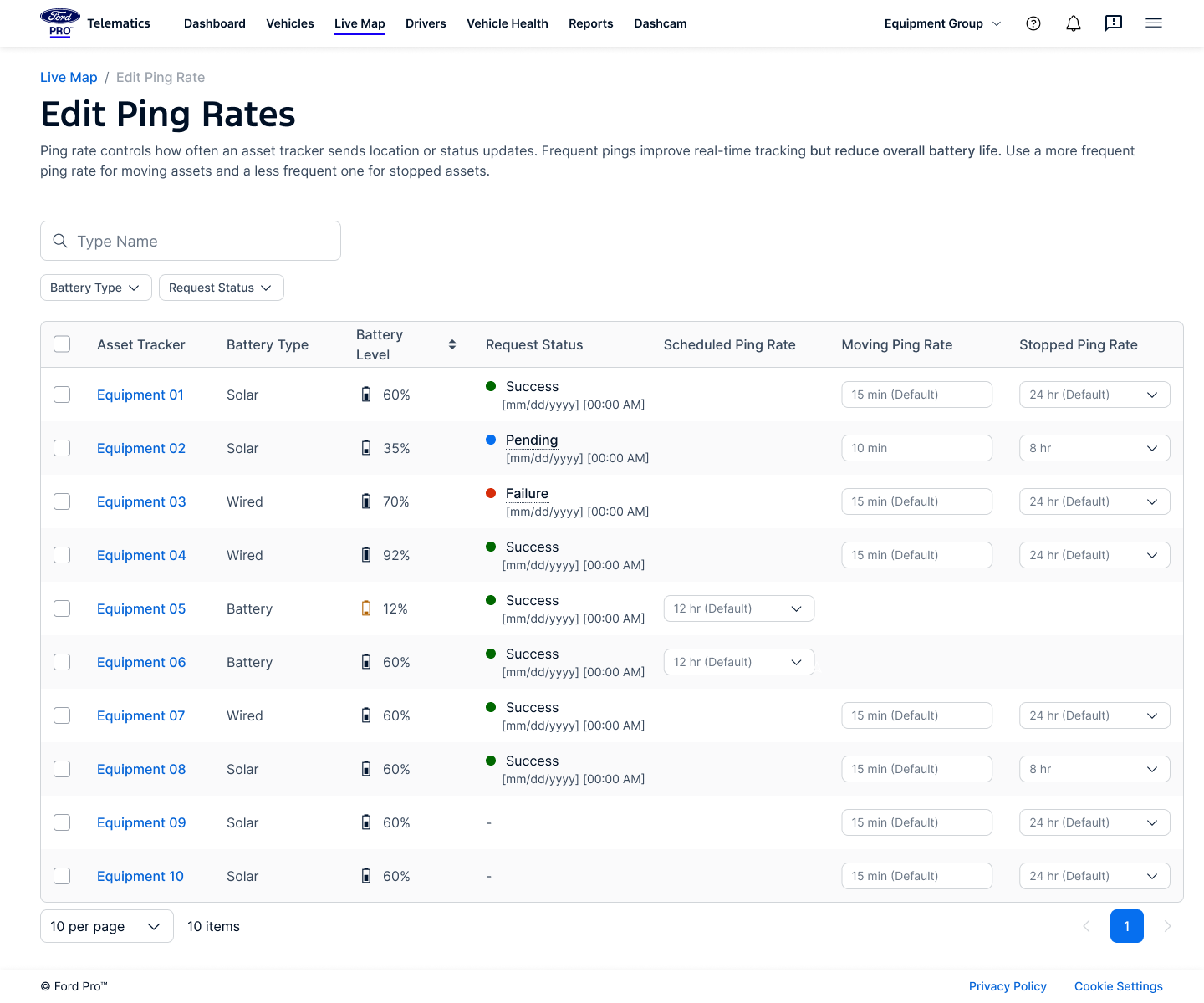
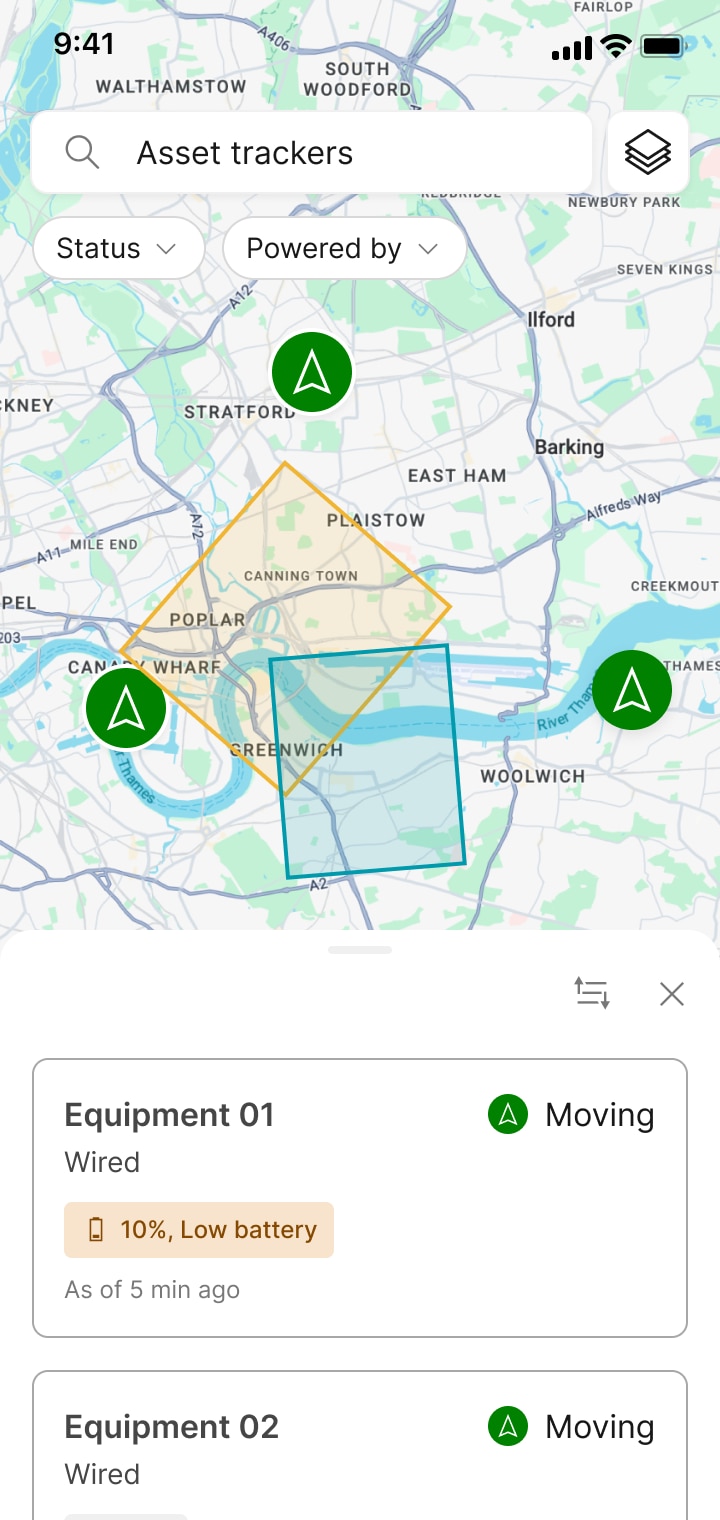
Live Map, Filter, and Sort in the Ford Pro Telematics Drive App
Fleet Managers can now easily monitor all Ford Pro Telematics asset trackers right from the Ford Pro Telematics Drive app. You can see every tracker on a live map or switch to a list view, making it simple to understand where your assets are at any moment. A powerful search bar helps you find specific assets quickly, while new filters – such as status, battery level and power type – let you narrow your view with ease. You can also sort your asset list for even faster navigation.
These updates include proactive low-battery alerts and clear status details, giving you the insight needed to keep assets secure, operational and ready for work. It’s a more efficient, more intuitive way to manage your entire asset fleet from your phone.
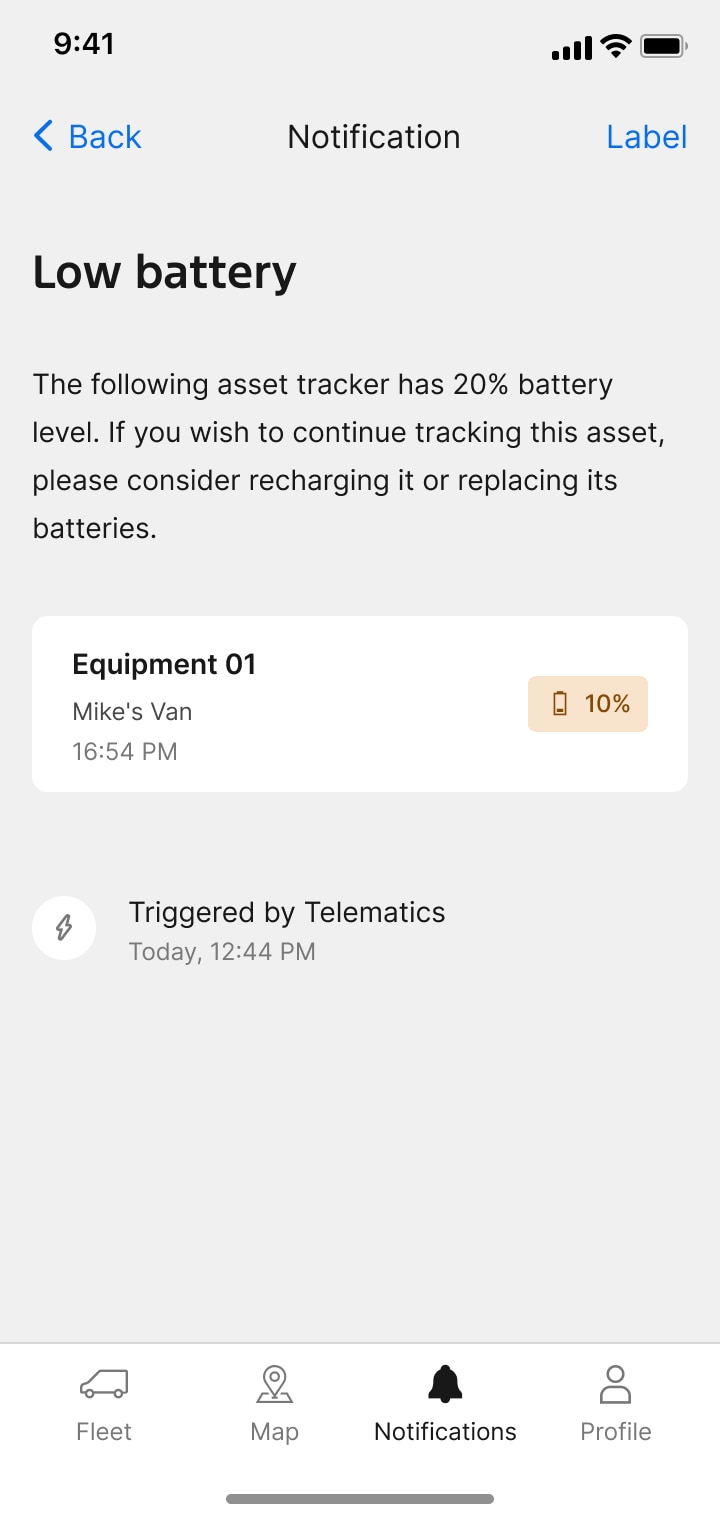
Asset Tracker Low Battery Notifications
Fleet Managers can now monitor the health of asset trackers directly from the Ford Pro Telematics Drive app with new low-battery notifications. When a tracker’s battery drops to 20%, the app will alert you – mirroring the notifications already available on the Telematics web platform for a consistent experience across both. These alerts appear in the app’s notification tab, helping you take timely action to keep your valuable assets powered, trackable, and connected.
New Geofence Improvements
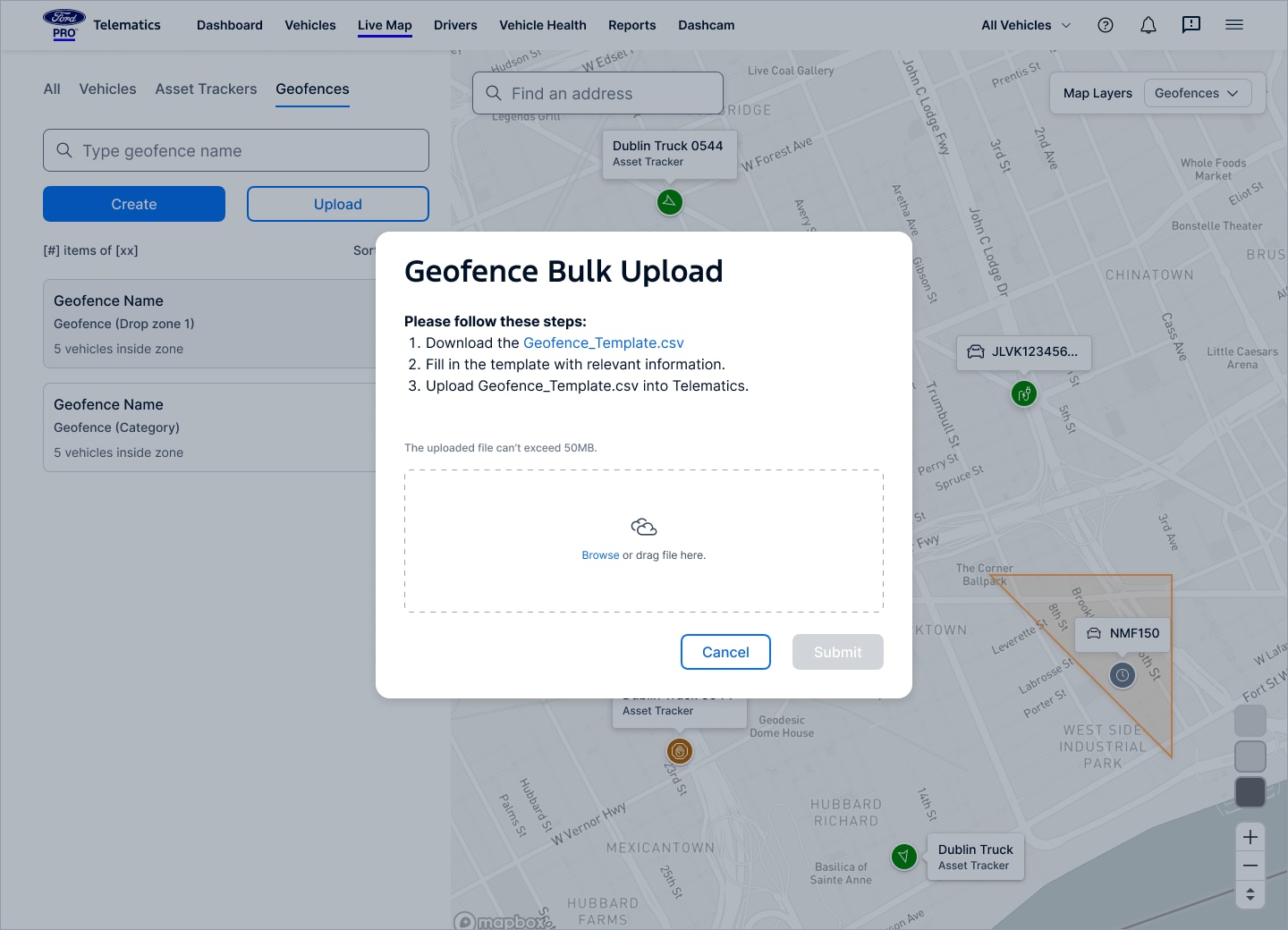
- Geofence Bulk Import Tool
For fleet managers with extensive operations, setting up and maintaining multiple geofences can be a major challenge – often a slow, manual task that limits scalability. The new Geofence Bulk Import Tool is designed to solve exactly that.
This feature empowers fleet managers to:
- Independently create and manage vast numbers of geofences
- Eliminate tedious manual processing
- Significantly boost operational efficiency and scalability
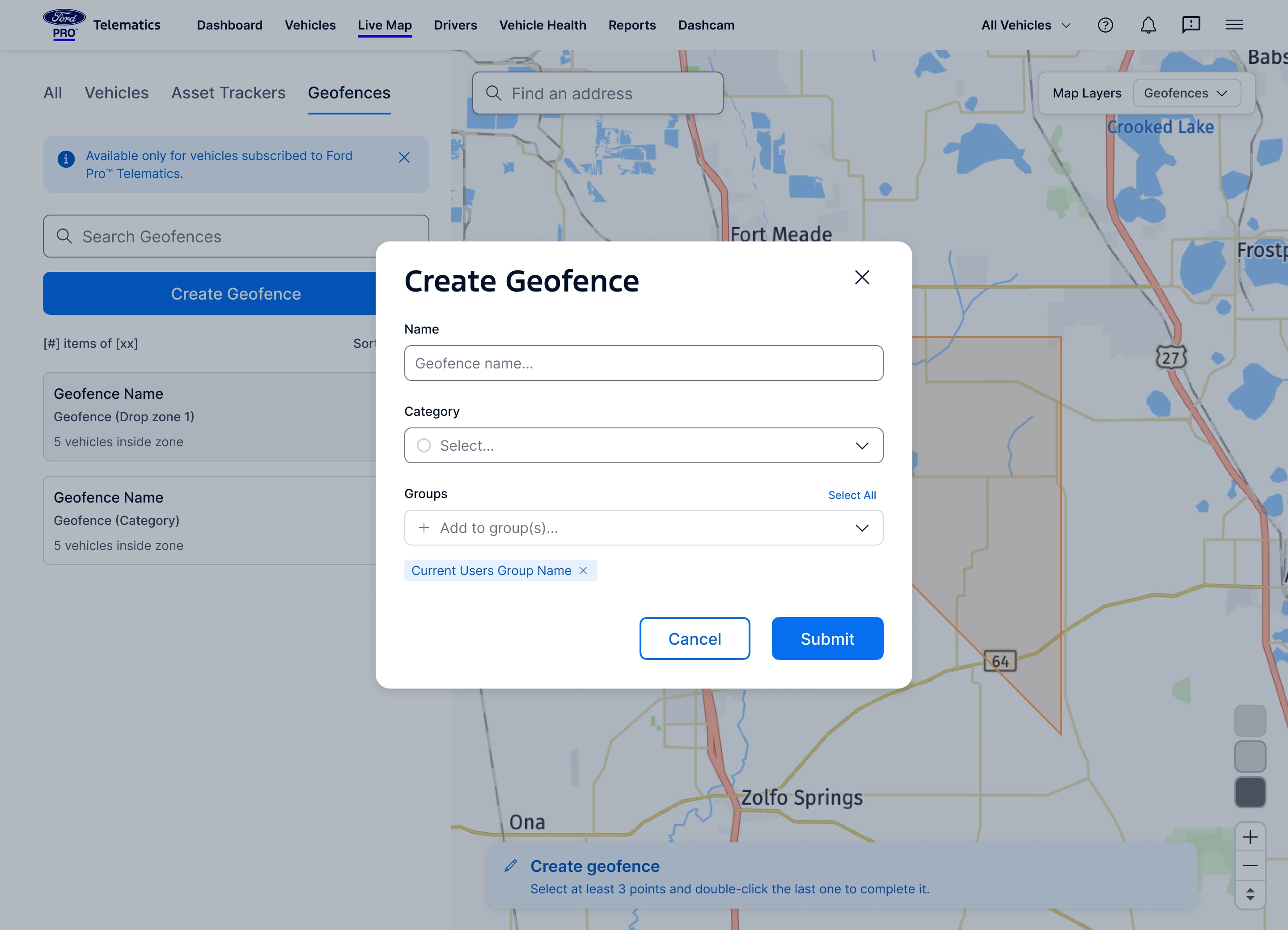
- Add Geofence to Multiple Groups
Fleet managers can now create a single geofence and apply it to multiple groups at once, making it easier to monitor assets, customer sites, and key locations. Previously, separate geofences had to be built for each group. This update gives you a simple, streamlined way to manage geofences across your fleet, helping you work faster, stay organized and define precise areas for accurate monitoring and alerts.
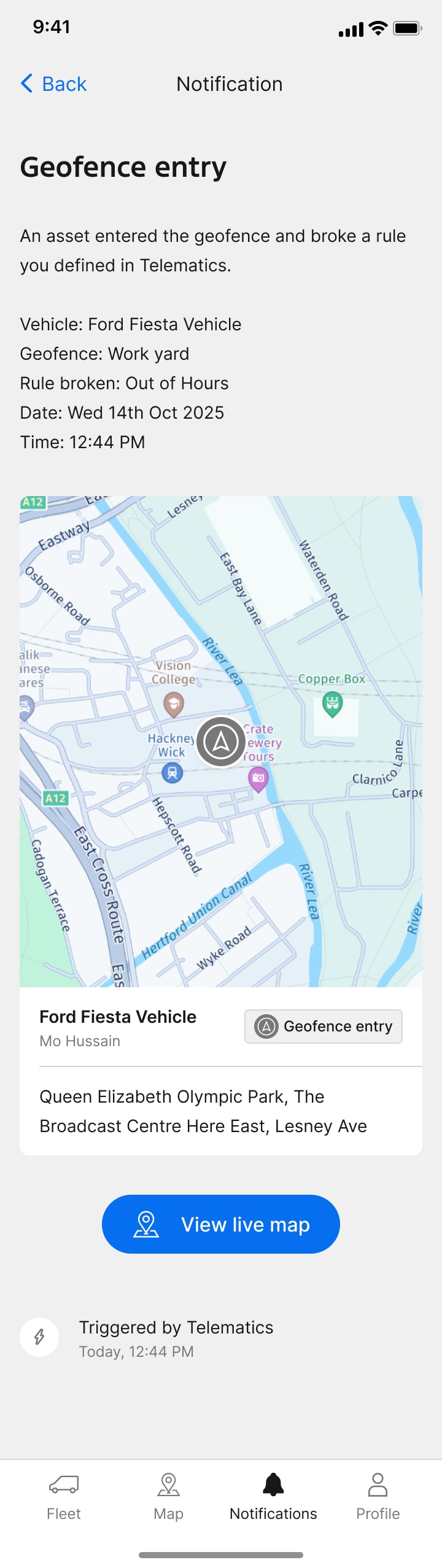
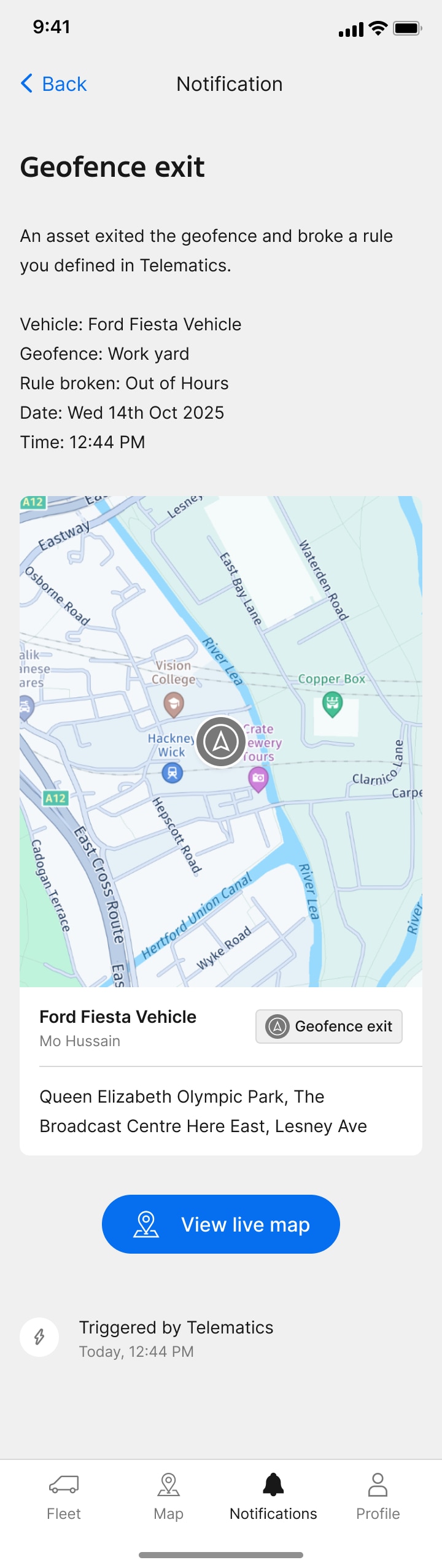
- Geofence Rule Violation Alerts
Fleet managers can now monitor geofence rule violations directly from the Ford Pro Telematics Drive app. The same entry and exit notifications you rely on in the Telematics web platform are now available on mobile, keeping you informed whenever a vehicle or asset crosses a defined geofence. This update ensures consistent visibility across platforms and makes it easier to stay on top of geofence activity from anywhere. All alerts can be viewed in the app’s notification tab for quick, on-the-go monitoring.
API: Vehicle Efficiency
Access detailed data about fuel and energy use directly from your internal systems with our new Vehicle Efficiency REST API. It delivers the same insights on fuel consumption, efficiency, distance, and idle time that power Ford Pro Telematics software – helping fleet managers fill data gaps, strengthen analysis, and build richer custom reports.
This API lets you pull VIN-specific efficiency data into your own tools to give you reliable, comprehensive visibility even in areas with limited network coverage. With seamless integration and complete historical data, you can create custom reporting, uncover potential cost-saving opportunities, and enhance operational decision-making across your fleet.
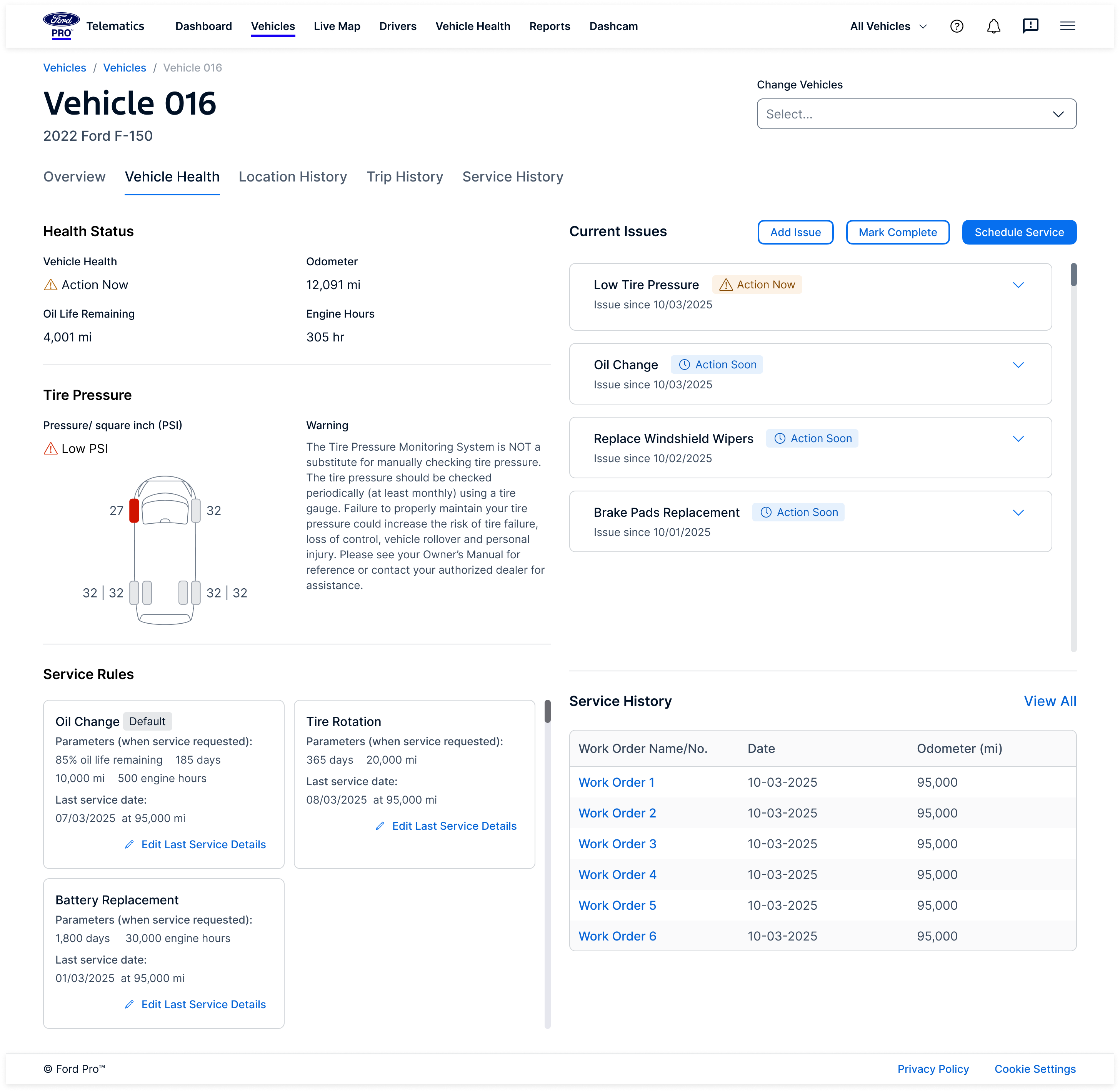
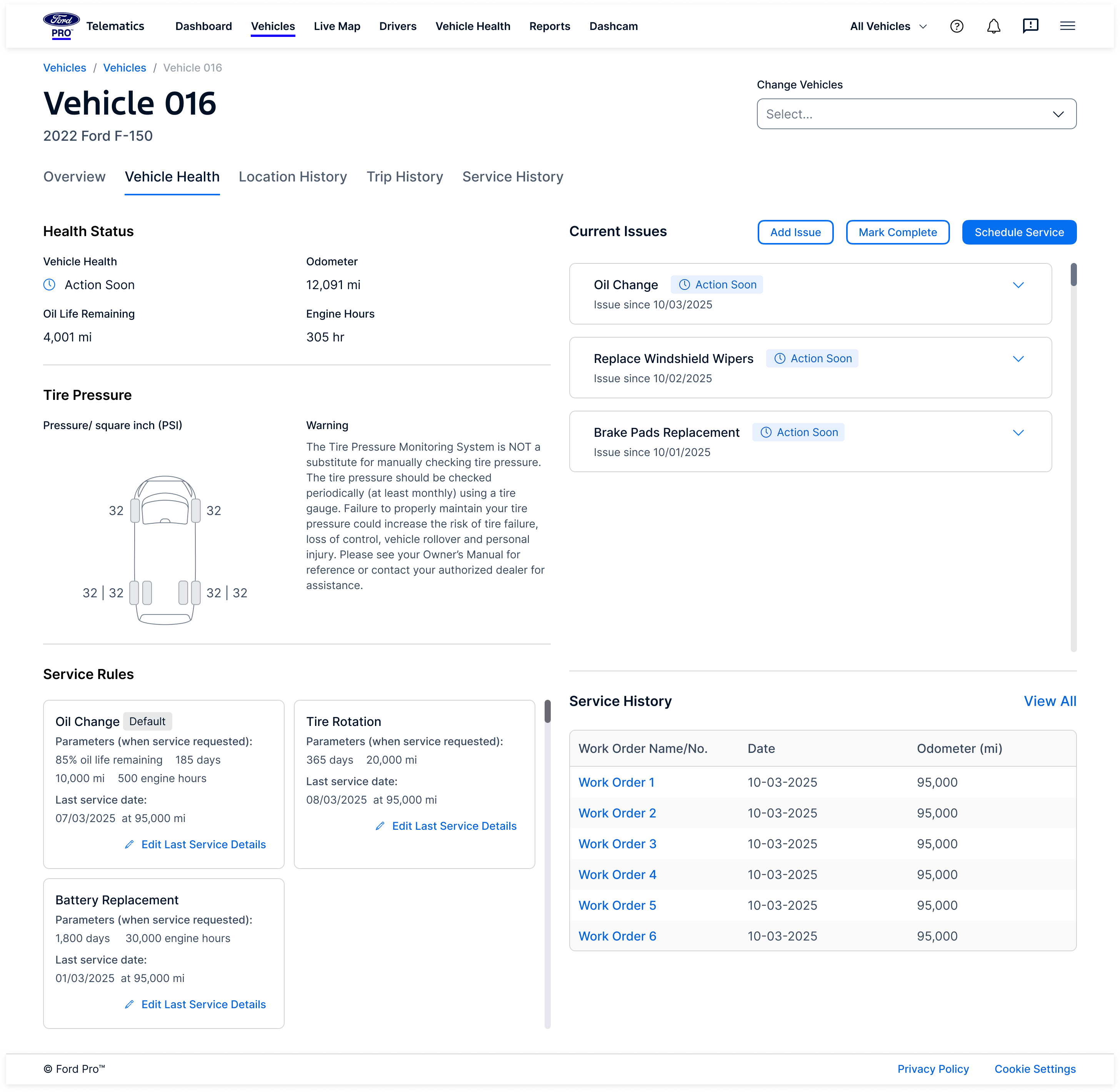
New: Expanded Tire Pressure Visibility
We’re excited to share an important enhancement to Ford Pro™ Telematics309 – expanded tire pressure information for our plug-in device (PID) enabled vehicles.
Until now, tire pressure insights were available only for Ford vehicles equipped with modems. With this update, fleet managers can now see tire pressure data for PID-equipped vehicles as well, enabling:
- Better visibility across your entire fleet of multi-make vehicles
- Early warning for low tire pressure
- Improved vehicle uptime
- More opportunities for proactive maintenance and potential cost savings
This enhancement closes a major information gap to enable smarter decision-making and keep fleets running more smoothly.
Lock/Unlock Status: More Accurate, More Secure, More Transparent
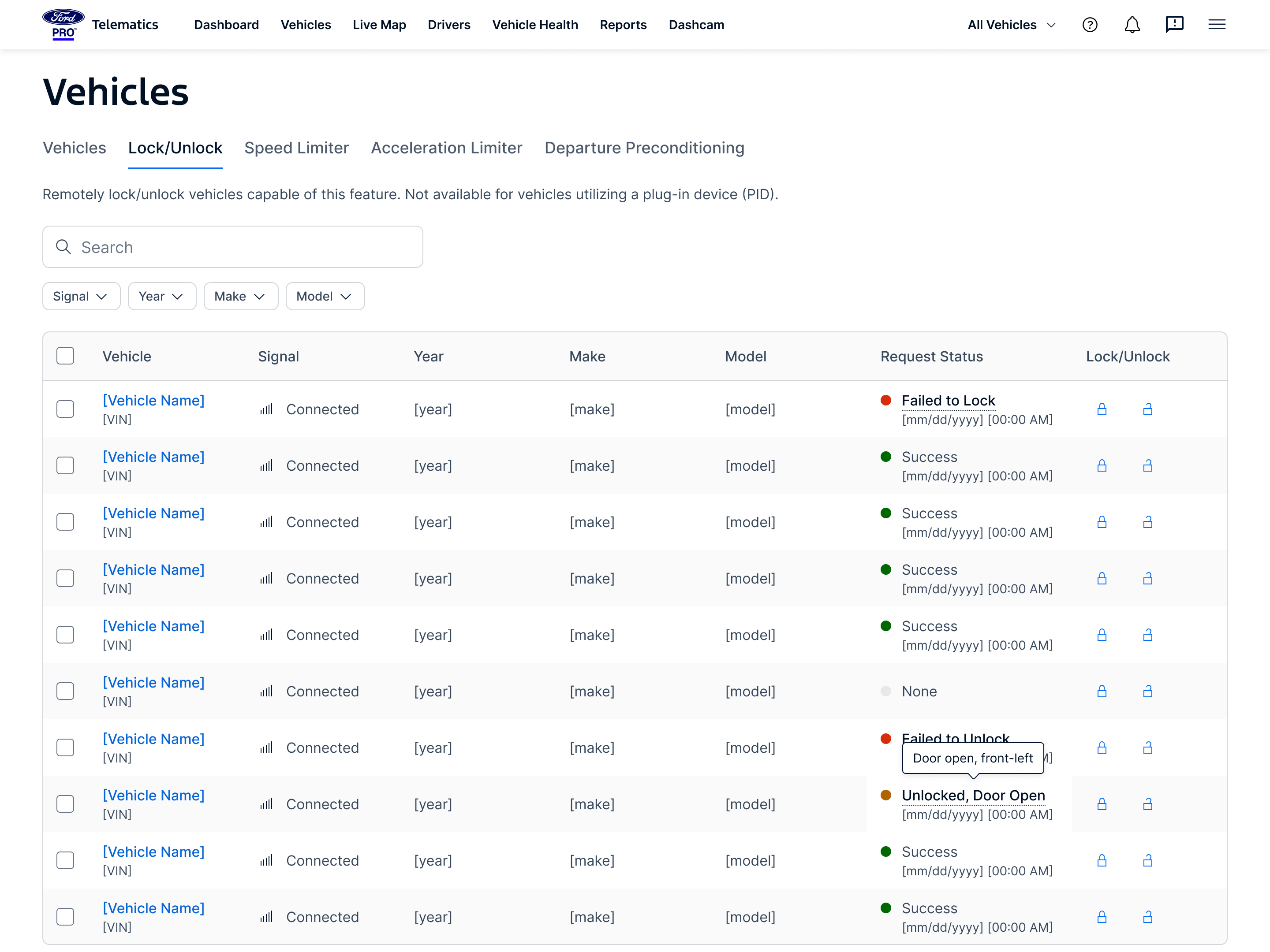
Be more confident in your fleet’s security. Through Ford Pro Telematics309 software you can now get clearer responses when you send remote lock or unlock commands – including alerts if a door is open and messages that explain exactly why a command didn’t go through. Spot problems like open doors or vehicles in deep sleep mode before they cause delays or create security risks. This update ensures you always know your vehicle’s true status – and gives you the information you need to stay in control.
Enhanced Speed & Acceleration Limiters: Built-In Control Without Extra Hardware
As a fleet manager, you can now set and enforce speed and acceleration limits directly through Ford Pro Telematics309 software on eligible Super Duty®, Transit® and E-Transit™ vehicles, in addition to the existing capability on F-150® Lightning – with no additional hardware required.
What this means for you
- Lower costs: Get the same functionality as external limiter devices without the purchase, installation or maintenance costs.
- Driving behavior management: Control vehicle speed and acceleration to help prevent risky maneuvers.
- Custom settings: Easily adjust limits to match your fleet’s needs – from delivery routes to heavy-duty operations.
- Regulation-ready: Support compliance and help your fleet avoid violations and stay protected.
This software-based solution gives you simple, powerful control over driver behavior – all within the Telematics software tools you already use.
Dashcam Events with Ford Pro Telematics with Dashcam1421: Faster, Smarter Filtering
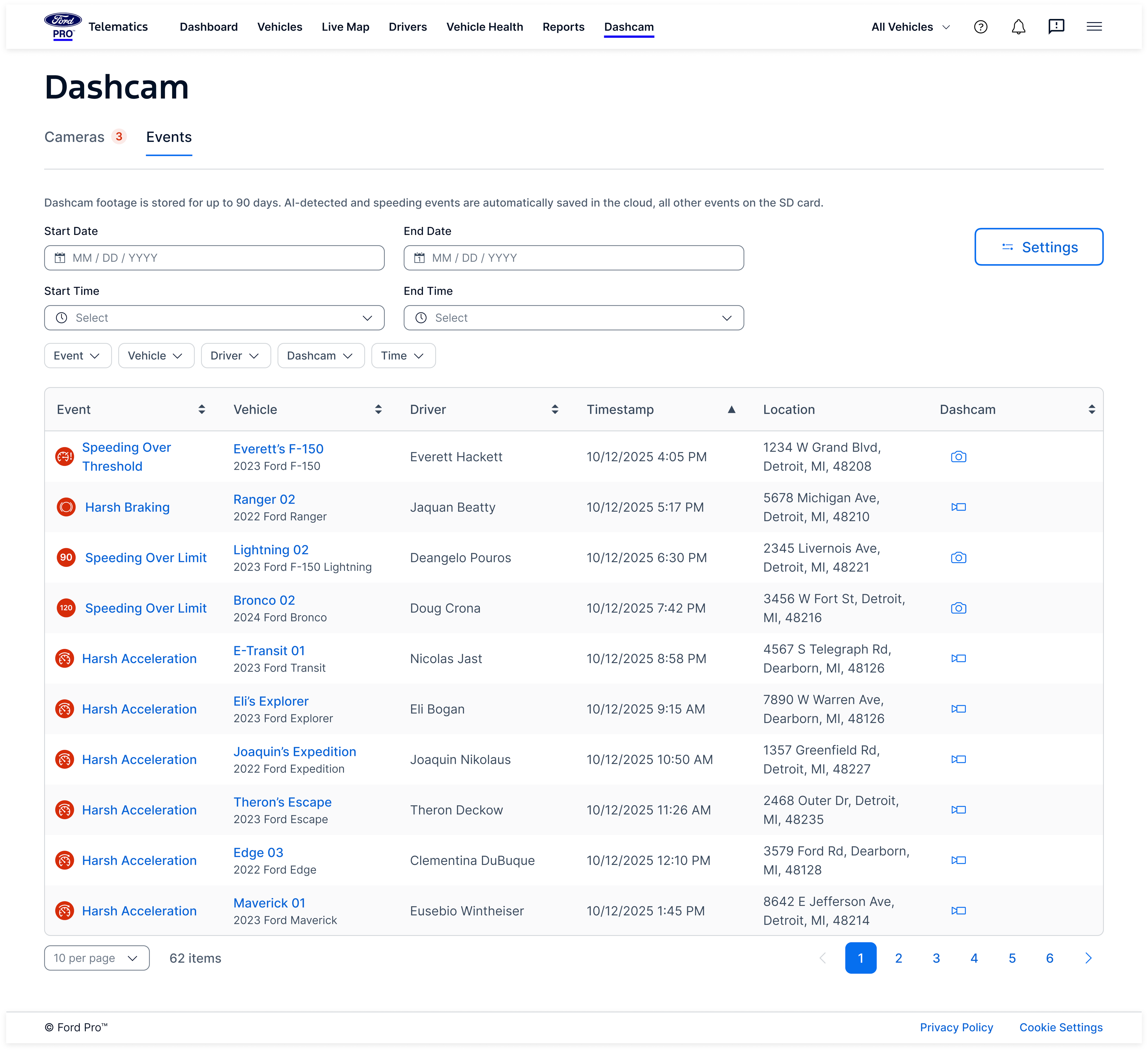
Reviewing dashcam footage just got easier. Fleet managers can now filter by date range, sort by newest or oldest and surface high-priority events instantly – helping you find the right footage faster for incident reviews, driver coaching and fleet safety. You’ll also notice:
- Quicker searches with precise date-range filtering.
- Cleaner sorting that lets you review footage in the order that works best for you.
- High-priority events first through an enhanced filter that highlights what matters most.
- Smoother reviews that help you get to the right clips faster for coaching, compliance, and incident response.
New Software Bundles Built for Your Fleet
Ford Pro Intelligence now offer software bundles that bring together our most valuable tools – including our Telematics software, Fleet Management software, Dashcam, and more – in a single, streamlined package. These bundles are designed to help you simplify operations, boost efficiency, and get more value from the technology you use every day.
By combining multiple products into one subscription, you can explore new features you may not have tried before while reducing the time and cost of managing separate services.
You’ll benefit from:
- Lower costs: Get more value in one bundle instead of paying for multiple standalone subscriptions.
- Access to new tools: Discover features that can enhance productivity and solve fleet challenges.
- Simpler management: One subscription, one bill, and fewer systems to track – making it easier to keep everything organized.
Misuse Rules: Accurate Alerts That Help You Protect Your Fleet
As a fleet manager, it’s important to know when a vehicle is being used outside approved times or locations. With this update, your misuse alerts now automatically adjust for daylight saving time – and no manual fixes are needed.
What this means for you:
- Fewer false alerts: No more confusion or incorrect notifications caused by time changes.
- Hands-off accuracy: Each vehicle’s misuse rules stay aligned to the correct time zone.
- Stronger oversight: You get dependable alerts that help you quickly spot and prevent unauthorized use.
Keep Driver Records Updated Automatically with REST API Integration
Your fleet’s existing internal systems can now connect to Ford Pro™ Telematics software, enabling you to seamlessly create, update and manage driver information – like adding new hires or updating certifications – across both platforms.
Through our new REST API, this integration eliminates tedious manual data entry, reduces errors, and provides enhanced scalability for large fleets with dynamic driver bases.
Ford Pro™ Telematics Drive992 App
Enhanced Driver Association Control for the Ford Pro Telematics Drive App
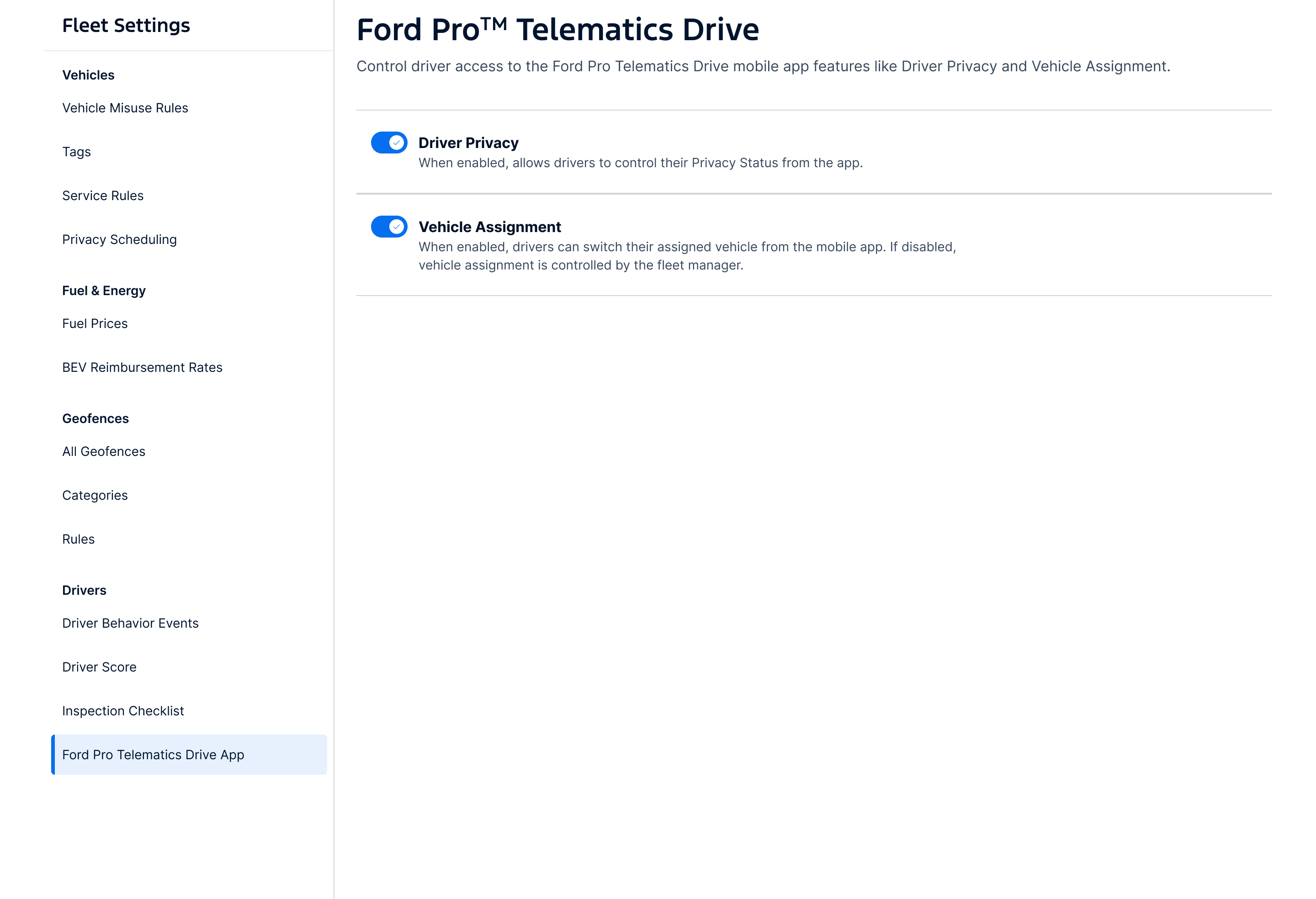
Fleet managers now have greater control over how drivers connect to vehicles in the Ford Pro Telematics Drive app. With this update, you can turn driver self-association on or off directly within your Ford Pro Telematics software dashboard.
This added flexibility strengthens fleet security, protects driver privacy, and keeps your data accurate. It’s especially valuable for fleets with 1:1 driver-vehicle assignments or take-home vehicles, where avoiding accidental or unauthorized associations is critical.
- Improved Vehicle Search
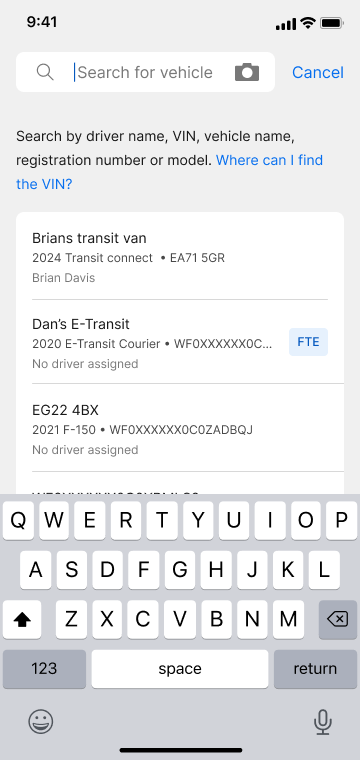
Locating vehicles in the Ford Pro Telematics Drive992 app is now faster and more intuitive for both fleet managers and drivers. The updated search experience prioritizes easy-to-recognize identifiers – like vehicle name and license plate – so you no longer need to rely on a VIN to find a vehicle. You can also search by model or assigned driver, giving you more precise ways to narrow results. Together, these enhancements create a more consistent and efficient search experience across the app, helping you identify vehicles quickly and confidently.
- Enhanced Map View Options for Greater Customization
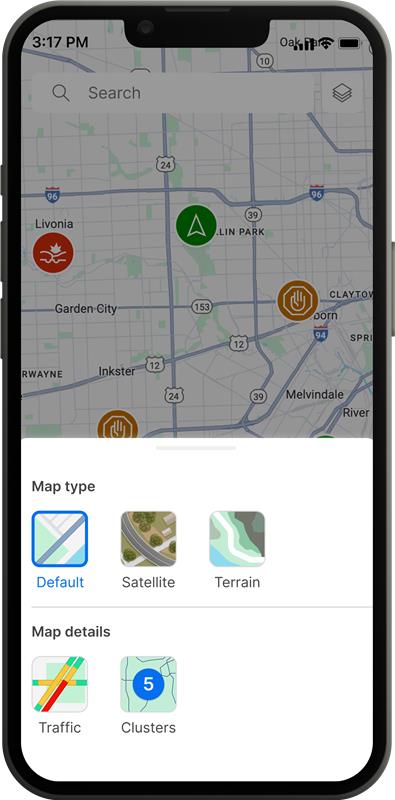
The Ford Pro Telematics Drive992 app now gives fleet managers more control over how maps are displayed. You can choose between default, satellite or terrain views and turn on live traffic overlay to support smarter planning and routing. Your selected map view now stays consistent across the app – including the Map tab, Trip History and Vehicle Location – so you don’t have to reset it each time you navigate. All map preferences are organized in a new, easy-to-access settings screen, making fleet monitoring more intuitive and efficient.
Fleet Management Software
NEW Advanced Analytics: Move From “What Happened” to “Why It Happened”
While Standard Reports give you a clear snapshot of daily activity, Advanced Analytics helps you dig deeper into the story behind your fleet data. This powerful new tool lets you uncover trends, spot outliers and make smarter, data-driven decisions – without exporting spreadsheets or relying on outside tools. Advanced Analytics is included at no extra cost for all premium package customers.
Key features:
- Understand the “why,” not just the “what”: Get flexible, in-depth analysis to reveal trends, benchmarks and broader insights.
- Customizable dashboards: Build dashboards around the metrics that matter most – whether it’s cost drivers, incident patterns or replacement timing.
- Spot trends and outliers: Quickly identify patterns and anomalies to improve decision-making and fleet performance.
- Easy sharing: Share dashboards with leaders and teams to align everyone around the same priorities – no spreadsheets needed.
Ford Pro™ Charging
NEW Ford Pro Electrification Advisory Services
Switching to electric doesn’t have to be complicated – and you don’t have to figure it out alone. Many Ford Pro customers have asked for help navigating the EV transition, which is why we created Electrification Advisory Services. Our team connects you with the right tools, services and experts at Ford Pro to make adding electric vehicles to your fleet simple and stress-free.
To date, we’ve helped more than 17,000 businesses make the move to electric. Whether you’re just starting to explore EVs or ready to take the next step, our experts can guide you every step of the way.
Access our complimentary advisory services today and let us help you build a smarter, more efficient fleet.

As always, we’re here to help you keep your fleet running smoothly – today, through year-end, and into the new year ahead.
Disclosure(s)
- 1)
Available on vehicles with embedded modem or equipped with approved plug-in device (PID). May require modem activation. Ford Pro Telematics, Ford Pro Data Services and Asset Tracking each require a purchased and/or additional subscription. Terms and conditions apply. Telematics service and features, and access to vehicle data, depend on subscription and compatible cellular network availability. Evolving technology/cellular networks/vehicle capability may limit functionality and prevent operation of connected features.
- 2)
Available on vehicles with embedded modem or equipped with approved plug-in device (PID). May require modem activation. Ford Pro™ Telematics and Ford Pro™ Data Services require a purchased subscription. Terms and conditions apply. Telematics service and features, and access to vehicle data, depend on subscription and compatible cellular network availability. Evolving technology/cellular networks/vehicle capability may limit functionality and prevent operation of connected features.
- 3)
Ford Pro™ Telematics Drive app, compatible with select smartphone platforms, is available via a download. Message and data rates may apply. Connected Services and features depend on compatible cellular network availability. Evolving technology/cellular networks may limit the functionality and use of app.
- 4)
Dashcam available on vehicles with embedded modem or equipped with approved plug-in device (PID). May require modem activation. Ford Pro Telematics, Ford Pro Data Services and Dashcam each require a purchased and/or additional subscription. Terms and conditions apply. Telematics service and features, and access to vehicle data, depend on subscription and compatible cellular network availability. Evolving technology/cellular networks/vehicle capability may limit functionality and prevent operation of connected features.