Ford Pro Release Notes
What’s New with Ford ProTM Software? May 2025 Edition
Keeping fleets running smoothly is our top priority — and we're here to make that easier than ever. We're excited to share the latest enhancements across the Ford Pro software suite, including expanded driver privacy controls for dashcams, more powerful API access for deeper fleet data integration, smarter EV charging software, the ability to see electric vehicle signals from Plug-In Devices (PIDs), even for non-Ford EVs, and enhanced map views in the Drive app that show key vehicle data directly on screen.
These updates are designed to give fleet managers greater control, deeper insights, and help optimize operations. Ready to see what's new? Check out the May 2025 edition of Ford Pro software updates below.
What’s New
Ford ProTM Telematics Software309
Dashcam Driver Recording Controls
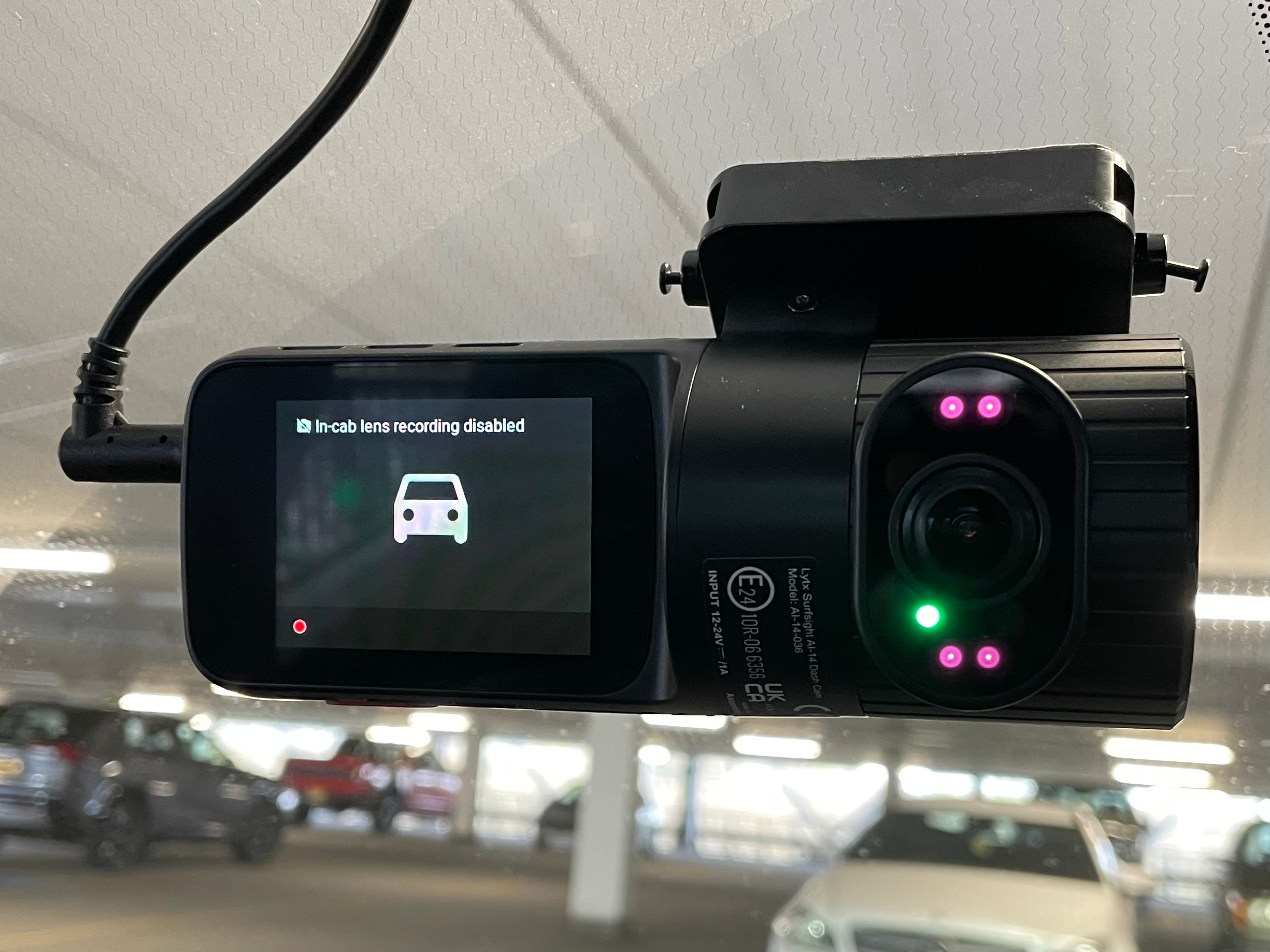
Driver Recording Controls is a new feature in the Ford Pro Telematics with Dashcam309, 129 that offers more control over driver privacy — allowing the driver to easily disable the driver-facing camera recording when appropriate.
To Manage Driver Recording:
- From the dashcam tab, click on the settings menu and choose “stop driver recording.”
- User can select one or more cameras and choose to stop or start driver recording.
- The camera status will change to display “Driver recording off” for all affected cameras.
Driver recording is enabled by default for both Ford Pro basic and enhanced Telematics with Dashcam subscription tiers. For those in advanced tiers, this recording is essential for powering AI event detection features such as distracted driving and cell phone use.
Note: If a vehicle has a privacy status of “GPS data off” or “all data off,” all dashcam recordings are disabled. If driver recording is re-enabled, a prompt will appear confirming the privacy status to “all data on.”
New Plug-in Device Updates
Plug-In Device Updates: Fleet managers who use PIDs in their fleet with a Ford ProTM Telematics subscription can now see electric vehicle signals.
Electric Vehicle Signals: Fleet managers can now access all electric vehicle insights in a single view through our seamless integration with PIDs and non-Ford electric vehicles. This comprehensive look provides essential information on range and state-of-charge, which is crucial for organizations transitioning to electric vehicles.
Fleet Management Software
API Endpoints
The latest updates to the Ford Telematics REST API are designed to provide customers with convenient access to their data and enable them to perform such functions as obtaining vehicle stats and health data, merging multiple data sets, or managing drivers. By integrating these capabilities into their own applications, customers can create unique views and insights.
Driver to Vehicle Association: Enables fleet managers to assign and unassign drivers to vehicles in their fleet and retrieve active associations.
Trip: Returns a list of trips for a VIN during a given start and end date.
Vehicle Health: Returns the current health status of the specified vehicle, including open vehicle health alerts and diagnostic trouble codes such as tire pressure, with details on the symptom, severity, category and action to be taken.
Vehicle Historical Status: Returns historical location and vehicle status values for vehicles in the fleet. Signals include: location, heading, odometer, ignition status, fuel level, key EV signals and more.
Vehicle Meta Data: Returns the list of fleet enrolled vehicles alongside metadata information including vehicle name, make, model and year. This information enables fleet fleet managers to integrate Ford’s other endpoint suite programmatically.
Vehicle Status: Returns the most current location and key vehicle status signals for the vehicles in one’s fleet. Signals include location, heading, odometer, ignition status, fuel level, key EV signals and more.
Data Services
Configuration Thresholds API
We recently launched a Configuration Thresholds API that lets you configure your Harsh Acceleration, Harsh Braking and Harsh Cornering thresholds and durations within a specified range. This enables alignment of Ford Pro OEM Event triggers by vehicle type or to comply with a standard threshold to enable consistent driver scoring.
The Harsh Events also now include a maximum value field reflecting the peak rate reached by the driver.*
The Configuration Thresholds API is available now for VINs enrolled in Data Services Premium SKUs.
*Subject to vehicle protocol version.
Ford ProTM Charging Software
Utility Rate Updates
The following updates help fleet managers save money on EV charging, get a more accurate understanding of energy spending, reduce the manual work involved in tracking rates, and make the initial setup process smoother.
- Simplified Selection: Popular utility plans are now displayed first for easier selection.
- Time-of-Use Rates: Time-of-use rates are now consistently applied, including weekends and holidays, to best reflect peak and off-peak energy rates.
- Cost-effective charging will prioritize charging during off-peak hours for profiles in managed mode. When disabled, the utility rates will only be used for energy cost reporting.
- Automatic utility rate updates (US only): Utility rate plans will now be automatically updated monthly to deliver up-to-date utility rates with no manual intervention.
Ford Telematics Drive App992
Map Enhancements
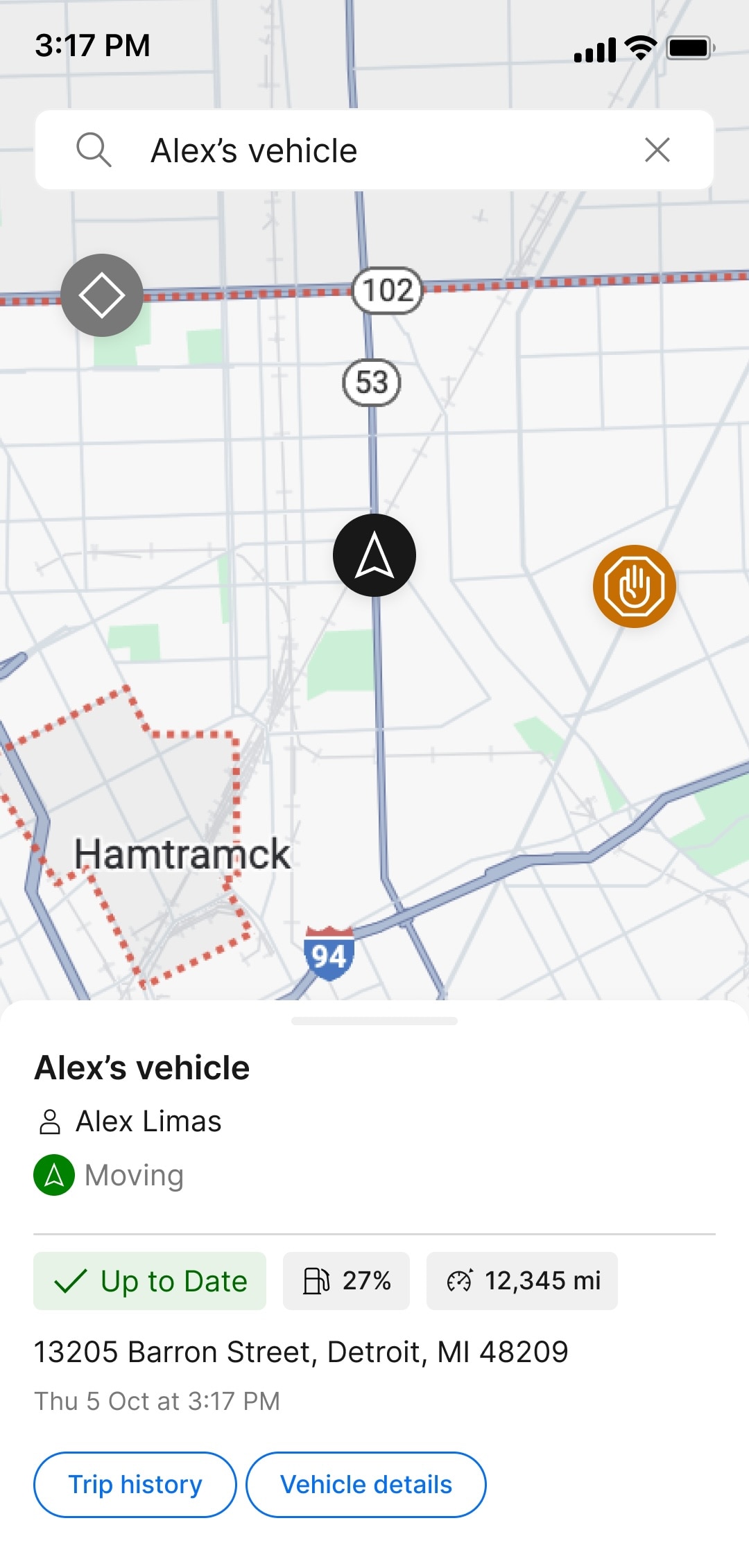
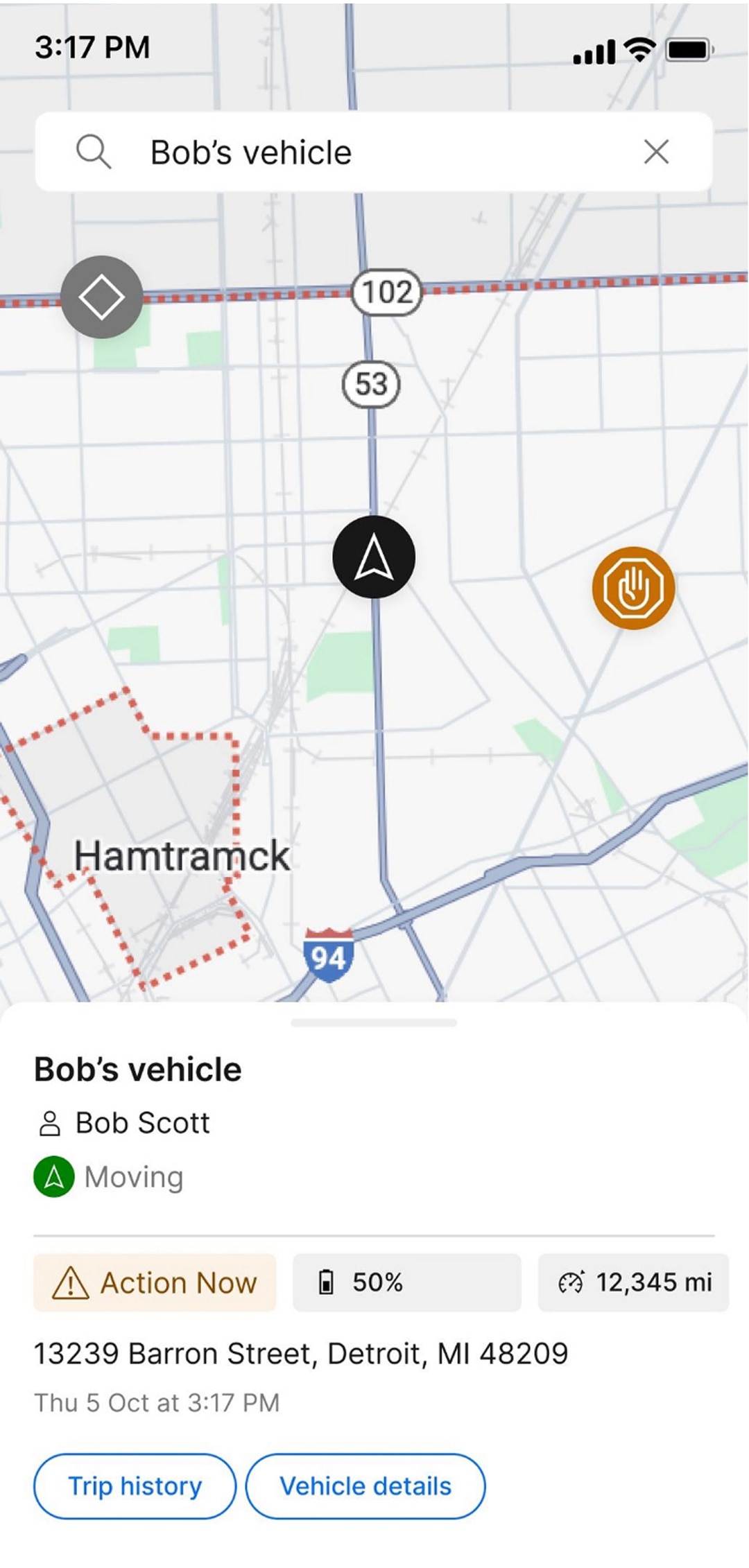
We’ve enhanced the map screen in the Ford ProTM Telematics Drive app to provide seamless access to vehicle data directly within the map interface. This improvement enables users to efficiently manage their fleets by making prompt, informed decisions without switching between screens. The following data have now been added to each vehicle’s location:
Fuel or Battery Data:
- Fuel level for internal combustion vehicles
- Battery and fuel levels for plug-in hybrid vehicles
- Battery level and range for electric vehicles
Odometer Reading: Easily track mileage.
Health Status: Quickly identify any reported issues with the vehicle.
These May updates reflect our ongoing commitment to delivering smarter, more secure, and more efficient tools to help you get the most out of your fleet. We’re excited about what’s ahead and we’ll continue to evolve to meet your needs.
Disclosure(s)
- 1)
Available on vehicles with embedded modem or equipped with approved plug-in device (PID). May require modem activation. Ford Pro™ Telematics and Ford Pro™ Data Services require a purchased subscription. Terms and conditions apply. Telematics service and features, and access to vehicle data, depend on subscription and compatible cellular network availability. Evolving technology/cellular networks/vehicle capability may limit functionality and prevent operation of connected features.
- 2)
Eligible (2022 and 2023 MY) vehicles receive a complimentary three-year trial of Ford Pro™ E-Telematics services, and eligible (2024, 2025 and 2026 MY) vehicles receive a one-year trial that begins on the new vehicle warranty start date. Requires modem activation. Terms and conditions apply. Telematics service and features depend on compatible cellular network availability. Evolving technology/cellular networks/vehicle capability may limit functionality and prevent operation of connected features. Annual service contract is required for E-Telematics service after trial. Call 1-833-811-3673 or go to FordPro.com to activate E-Telematics service.
- 3)
Ford Pro™ Telematics Drive app, compatible with select smartphone platforms, is available via a download. Message and data rates may apply. Connected Services and features depend on compatible cellular network availability. Evolving technology/cellular networks may limit the functionality and use of app.