Ford Pro™ Release Notes
What’s New with Ford Pro™ Software? November 2026 Edition
Every month we bring new updates that help make managing your fleet operations easier. The latest enhancements to our digital fleet solutions are designed to give fleet managers quicker access to critical information, more visibility across vehicles, and smarter tools that reduce daily friction. From more efficient fleet maintenance and service to centralized control of your fleet operations, these updates help fleet managers spend less time waiting and more time doing.
What’s New
New Feature
Available Now in North America
A single view of geofence activity across vehicles and assets.
Ford Pro Telematics Software subscribers can now view when vehicles and equipment enter or leave a virtual boundary set on a map, such as job sites, depots, or customer locations, through geofence entry, exit, and duration activity across both vehicles and Asset Trackers. Both can now be seen in a single report, making it easier to monitor and analyze asset utilization from one place.
The Geofence Activity Report can also be scheduled for daily, weekly or monthly delivery, helping fleet managers stay informed without manually pulling reports.
New Feature
Available Now in the Ford Pro Telematics Drive App
Stay connected to dashcam footage on-the-go.
Ford Pro Telematics Software subscribers with an eligible Dashcam subscription can now access Dashcam Live View and historical event footage through the mobile app. In the Ford Pro Telematics Drive app, you can view live road and cabin feeds alongside vehicle speed, direction, and route information, or search up to 90 days of cloud-stored event footage by date and event type.
Event videos and photos can be played back and shared directly from a mobile device, with the incident location displayed on a map.
Find Dashcam Footage Faster with Look Back.
Ford Pro Telematics Software now enables fleet managers a Look Back timeline in Trip History. The new feature reduces guesswork, failed requests, retrieval time, and unnecessary data use. It supports faster incident investigations, driver coaching, and customer complaint resolution by helping fleet managers quickly find and request Dashcam footage, even when an incident didn’t trigger an alert.
It shows where footage is available alongside trip events, and enables targeted 10, 20, or 30 second clip requests.
Enhancement
Available Now
Privacy settings that fit real-world routines.
Ford Pro Telematics Software subscribers can now create Privacy and Misuse schedules that extend into the following day. Instead of creating multiple rules, fleet managers can set up a single overnight window, such as 7 p.m. to 4 a.m., to better reflect how their operations run.
A "+1" label clearly identifies schedules that continue into the next day, while expanded scheduling options provide greater flexibility across different shifts and operating hours.
Enhancement
Available Now
Stay ahead of battery issues with simpler battery insights.
Ford Pro Telematics Software subscribers now receive low battery alerts in a single daily summary rather than individual real-time messages for each vehicle. This gives fleet managers one place to review battery health information across affected vehicles without receiving repeated notifications throughout the day.
Scheduled notifications now cover a complete calendar day, helping align battery information with daily reporting and fleet workflows.
New Feature
Available Now
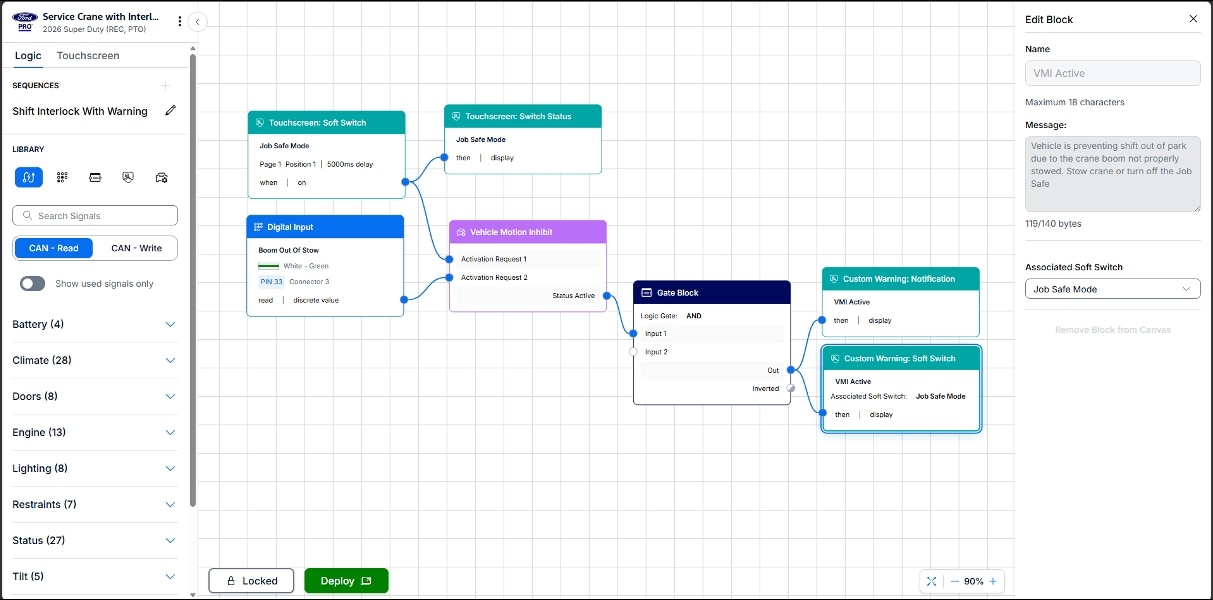
Vehicle Upfitting now in the cloud.
Ford Pro’s Vehicle Integration System has been updated in the cloud. The updated platform is designed to support the creation, management, and deployment of vehicle upfits. The updated experience includes a block library, improved canvas navigation, contextual settings, color-coded block categories, and autosaving functionality.
Because projects are created in the cloud, upfitters can receive tool updates and feature improvements without manual software installations. Securely set up vehicles and automatically install updates right from the desktop app. Existing projects can also be migrated to the new cloud-based tool while preserving logic structures and block connections.
Enhancement
Available Now
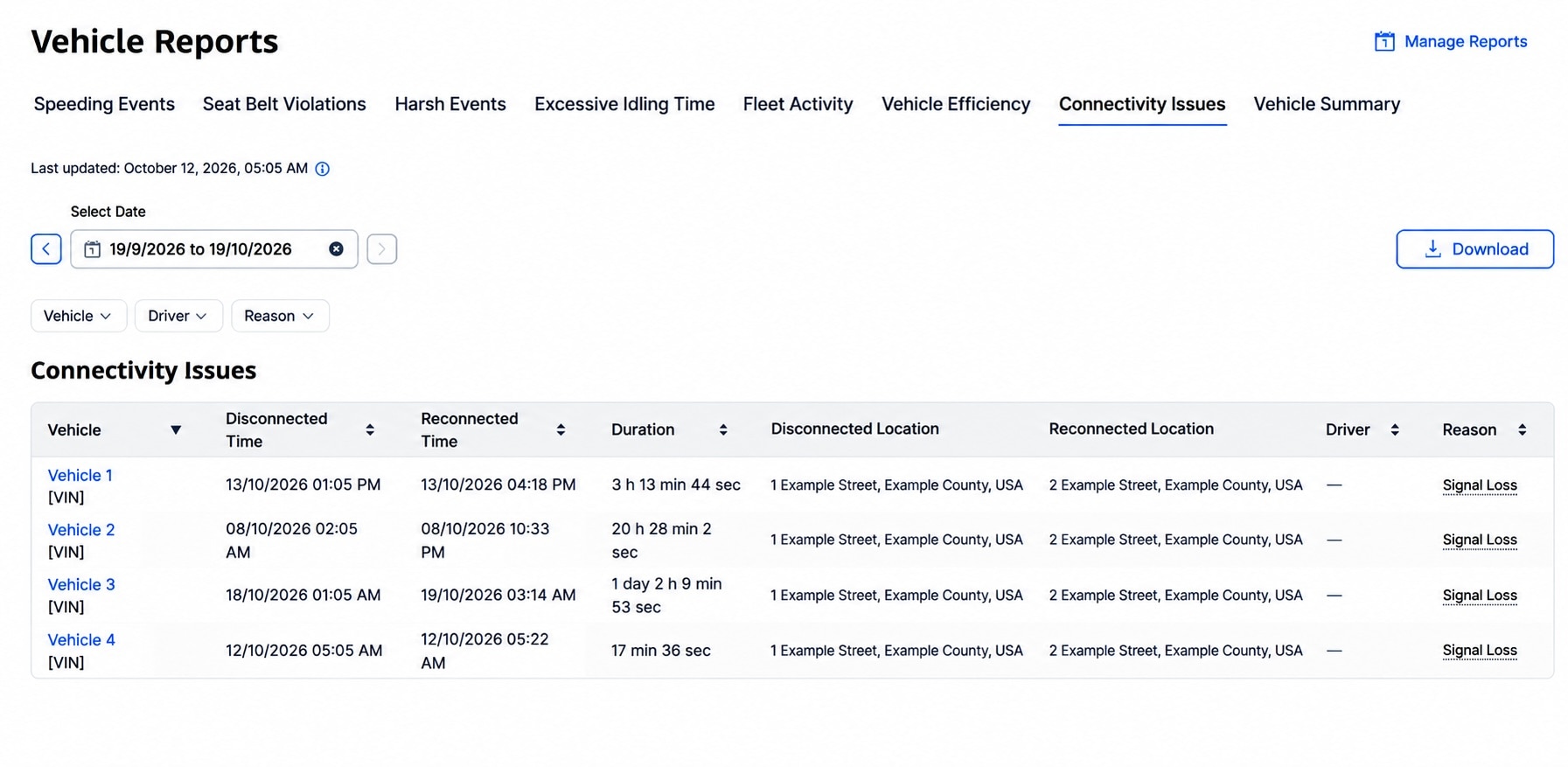
See When and Why Vehicles Stop Sending Data.
A new Connectivity Issues Report in Vehicle Reports is now available to show every historical data outage per asset with start and end times, duration, last and first known locations, assigned driver and reason.
Available now to Ford Pro Telematics Software subscribers you can quickly understand why a vehicle isn't sending data, how long it lasted, and the reason, from Deep Sleep or Signal Loss to Privacy Mode.
- Deep Sleep: If a vehicle hasn’t started for 14 days or more, or its battery is low, it may temporarily stop sending data to protect the battery. Starting the engine reconnects the modem.
- Disconnected: This status appears when a vehicle with a modem hasn’t sent data for more than 25 hours.
Simple explanations and troubleshooting tips appear in the Connectivity column to help you decide which vehicles may need attention.
Enhancement
Available Now in the Ford Pro Mobile App
Add an extra layer of security to mobile account access.
Users of the Ford Pro Mobile App are now required to verify their identity using Multi-Factor Authentication (MFA) when signing in. In addition to a password, users can choose a verification method including email, SMS, or an authenticator app.
The update helps protect fleet and driver information from unauthorized access while maintaining a familiar sign-in experience across Ford Pro digital tools. Existing MFA preferences configured on FordPro.com are automatically applied in the app, helping users get started without additional setup.
Enhancement
Available Now
Go directly from an alert to the information you need.
Ford Pro Telematics Software subscribers can now open notifications directly to the relevant vehicle, event, or report, reducing the need to manually search for information after receiving an alert.
Contextual links automatically apply available filters such as vehicle, date, and time, helping fleet managers investigate events faster and take action more quickly. Supported notifications include speeding, seat belt usage, idling, collision alerts, tire pressure notifications, service alerts, and more.
Enhancement
Available Now in Europe
Book vehicle service directly from the Ford Pro Mobile App.
Fleet managers using the Ford Pro Mobile App in Europe can now schedule service appointments directly from the app after a vehicle issue is identified. Users can search for nearby service locations, save preferred dealers, and schedule appointments without needing to switch tools or return to a desktop computer.
By connecting vehicle health alerts with service scheduling in the same experience, fleet managers can respond to maintenance needs faster and help reduce vehicle downtime.
New Product/Service
Available Now
Keep vehicle titles secure and readily accessible.
Ford Pro customers can now store vehicle titles in a centralized, secure storage facility designed to help protect important documents from loss or damage. Titles are maintained in a fire- and water-resistant safe within a secure vault, helping reduce the administrative burden and potential costs associated with misplaced or compromised titles.
By centralizing title storage, fleet managers can simplify title management processes, free up internal resources, and improve operational efficiency. Titles can also be retrieved on demand, providing quick access when needed for transfers, audits, or other business requirements.
Title Storage and Title & Registration are two separate services and can be purchased separately.
Enhancement
Available Now
Ford Pro FMS Premium Plans only
U.S. and Canadian customers
Must have a PartsTech account (account is free)
Order parts and tires through a more streamlined maintenance workflow.
Ford Pro Fleet Management Software users can now connect supplier sourcing with purchase order creation in a single workflow. The enhancement helps fleet managers manage parts and tire purchases more efficiently while maintaining greater control over procurement activity across fleet locations.
By reducing manual steps and centralizing the purchasing process, fleet managers can help keep vehicles on the road while improving visibility into maintenance-related spending and approvals.
Enhancement
Available Now
Ford Pro FMS Professional and Premium Plans
U.S. and Canadian customers
Customize records to fit the way your fleet operates.
Ford Pro Fleet Management Software administrators can now create custom records to capture and manage information specific to their business needs. The added flexibility helps fleet teams track unique operational data alongside their existing fleet management workflows.
By bringing information from off-platform processes into Ford Pro Fleet Management Software, fleet managers can create a more centralized view of their operations, reduce manual tracking, and keep important business information connected to the work being done across their fleet.
These updates from Ford Pro bring fleet managers faster insights, simpler workflows, and greater confidence in daily decisions.
Disclosure(s)
Available on vehicles with embedded modem or equipped with approved plug-in device (PID). May require modem activation. Ford Pro™ Telematics and Ford Pro™ Data Services require a purchased subscription. Terms and conditions apply. Telematics service and features, and access to vehicle data, depend on subscription and compatible cellular network availability. Evolving technology/cellular networks/vehicle capability may limit functionality and prevent operation of connected features.
Call 1 (833) 811-3673 or go to fordpro.com to activate E-Telematics service.